Replace dotenv (Node.js)
dotenv reads a .env file from disk and
copies its KEY=VALUE pairs into process.env. It's the default way Node projects
load configuration — and it means your real secrets live in a plaintext file that
is one git add away from being committed, shared over Slack, or baked into an
image.
seekrit replaces that file. Your secrets are encrypted on your machine and stored
as ciphertext; at runtime the CLI decrypts them locally and injects them into
process.env — exactly where your code already reads them. Your application code
doesn't change: process.env.DATABASE_URL keeps working. You just stop shipping
the plaintext file and delete the dotenv dependency.
- import "dotenv/config";        // reads .env off disk
+ // nothing — seekrit injects process.env before your code runs
- node server.js # relied on a committed .env
+ seekrit run -- node server.js # decrypts & injects, then runsThis guide assumes you've done the Quickstart: installed the CLI, signed in, and created an application and environment. If not, do that first — it takes a few minutes.
1. Import your existing .env
Bulk-load the file you already have. Each KEY=VALUE is encrypted locally and
stored under the target environment; the API only ever receives ciphertext. Preview
first with --dry-run — it lists which names are new versus updates and writes
nothing:
seekrit secrets import .env --app storefront --env production --dry-run
seekrit secrets import .env --app storefront --env production
The importer understands the same .env syntax dotenv does — export prefixes,
# comments, and single/double quotes, including quoted values that span several
lines. An invalid variable name aborts the whole import before anything is
written, so it's all-or-nothing.
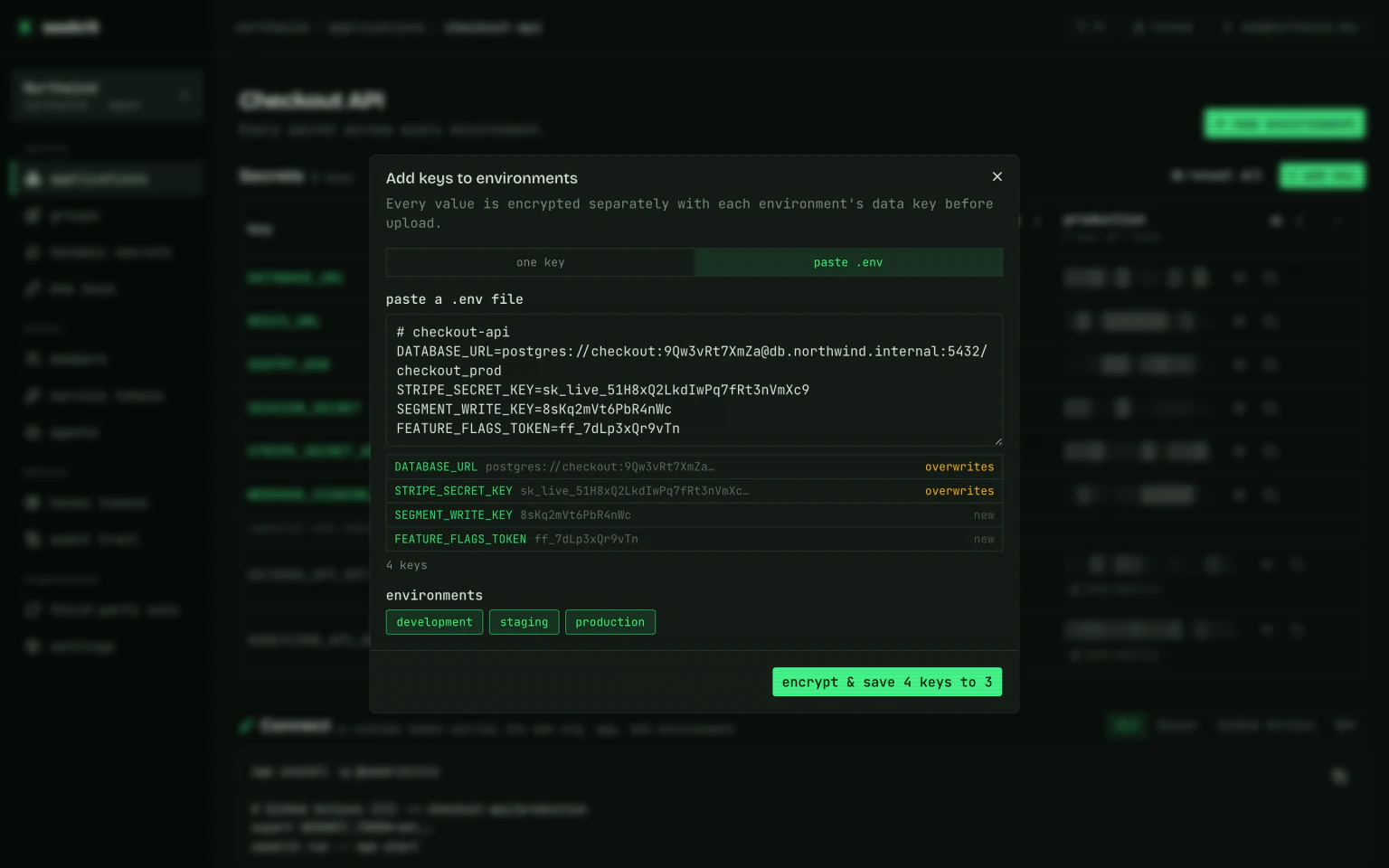
Prefer the browser? Add key on an application or environment page has a paste .env tab that runs the same parser. It previews every key it found — truncated value, and whether it's new or overwrites what's there — and writes to as many environments as you select at once, encrypting separately for each. Names that aren't valid variable names are listed as skipped rather than aborting the paste, since the preview shows you which ones before you commit.
Migrating more than one environment? Import each file into its own environment:
seekrit secrets import .env.development --app storefront --env development, and
so on. Config several apps share belongs in a group — see
Environments & groups.
JSON credentials
A Google service-account key, a Firebase config, a Kubernetes pull secret — a JSON blob is one string as far as seekrit is concerned, and it is stored and delivered byte-for-byte. The friction is only ever in the file format around it.
The simplest path skips .env entirely — point at the file you downloaded:
seekrit secrets set GOOGLE_SERVICE_ACCOUNT --file ./service-account.json \
  --app storefront --env production
In the dashboard, the same thing: Add key → one key, paste the JSON into the value box. It's marked as JSON once it parses, with a format button to re-indent it; if it doesn't parse, you find out there rather than at 3am.
If you do keep it in a .env file, wrap it in single quotes — the value is
full of double quotes and \n escapes that need to survive as written, and
single quotes are literal. The value may span as many lines as it likes:
GOOGLE_SERVICE_ACCOUNT='{
  "type": "service_account",
  "private_key": "-----BEGIN PRIVATE KEY-----\nMIIEvQ…\n-----END PRIVATE KEY-----\n"
}'Without the quotes, the value stops at the end of its line and the JSON's own
lines are read as further assignments — a handful of nonsense names instead of
an error. The dashboard's paste .env tab flags this before it writes
anything; the same applies to .env files read by seekrit run --env-file.
2. Run your app through seekrit
seekrit run resolves the environment, decrypts it locally, injects it into the
child process, and then runs your command. Anything after -- is your command,
verbatim:
seekrit run --app storefront --env production -- node server.js
seekrit run --app storefront --env production -- npm run dev
Confirm a value made it in without printing secrets to your shell history:
seekrit run --app storefront --env production -- node -e "console.log(!!process.env.DATABASE_URL)"
# true
Because seekrit populates process.env before your code runs, every
process.env.X read works unchanged — there is nothing to load.
3. Delete dotenv from your code
Remove the loader line and the dependency. Your process.env.* reads stay exactly
as they are.
- import "dotenv/config";
- // or: require("dotenv").config();

  const dbUrl = process.env.DATABASE_URL;
If you preloaded it on the command line (node -r dotenv/config) or via a package
script, drop that too, and wrap the script with seekrit run:
  // package.json
  "scripts": {
-   "dev": "node -r dotenv/config server.js",
+   "dev": "node server.js",
    "start": "node server.js"
  }
npm uninstall dotenv dotenv-cliRun the wrapped scripts through the CLI. With a service token in the environment
(next section) it's just seekrit run -- npm run dev; interactively, name the
target:
seekrit run --app storefront --env development -- npm run devDon't want to type seekrit run every time in local dev? Add a thin script —
"dev:secrets": "seekrit run -- npm run dev" — or export a service token in your
shell profile so a bare seekrit run -- … resolves everything.
4. Local overrides still use .env
You don't lose the convenience of a local file. seekrit run auto-loads .env
from the working directory and layers it on top of the managed secrets, and the
live shell wins over everything:
group secrets < app-env secrets < .env file < process env (highest wins)
So you can override a single value locally without touching the shared set — point a service at a local database, say — while every other variable comes from seekrit:
echo 'DATABASE_URL=postgres://localhost/dev' > .env.local
seekrit run --env-file .env.local -- npm run dev   # .env.local wins for that one key
Not sure where a value resolved from? --explain prints each variable's source
layer to stderr (names only, never values):
seekrit run --app storefront --env development --explain -- trueA leftover committed .env will silently shadow your managed secrets, since
the file layer wins. After importing, delete the committed file and gitignore any
local one — see Clean up.
5. Clean up the plaintext file
Once secrets are imported and the app runs through seekrit run, remove the
plaintext .env from the repo and stop tracking it:
git rm --cached .env
echo '.env' >> .gitignore
echo '.env.local' >> .gitignoreA secret that was ever committed is compromised even after you delete it — it
stays in git history. Treat imported values as needing rotation, and reissue any
key that lived in a committed .env.
Framework notes
Most Node frameworks read process.env, so wrapping their dev/build/start command
with seekrit run is all it takes.
- Next.js loads its own
.env*files, but variables already present inprocess.envtake precedence — soseekrit run -- next devandseekrit run -- next buildjust work. Remember Next only exposesNEXT_PUBLIC_-prefixed vars to the browser; that's unchanged. - Vite exposes only
VITE_-prefixed vars to client code and reads them fromprocess.envat config time:seekrit run -- viteandseekrit run -- vite build. Where you don't control the command — a platform's build step, an editor running Vitest — the Vite plugin resolves from inside the config instead. - TypeScript runners (
tsx,ts-node) and nodemon need no dotenv preload —seekrit run -- tsx watch src/server.ts,seekrit run -- nodemon server.js. - Node's built-in
--env-file(Node 20.6+) is the same idea as dotenv and can likewise go away; let seekrit inject instead ofnode --env-file=.env.
Production, CI, and containers
In local dev you resolve as yourself. Everywhere else, authenticate with a
service token — mint one bound to an environment in the console (or with an
admin token). It carries its own org, app, and environment, self-decrypts with no
passphrase, and can be revoked independently, so seekrit run needs no other
flags:
export SEEKRIT_TOKEN=skt_…
seekrit run -- node server.js
For runtime images, skip Node entirely with the static
seekrit-run launcher — same layering and .env parsing, in a
~2 MB dependency-free binary:
SEEKRIT_TOKEN=skt_… seekrit-run -- node server.jsSee Service tokens for minting and scoping, and CI/CD & containers for pipeline and image wiring.
Next steps
- Share config across services with Environments & groups
- Mint and scope machine credentials with Service tokens
- Go Node-free in containers with the
seekrit-runlauncher - Browse every flag in the CLI reference