Audit log export
Stream your organization's audit trail to your own security tooling. seekrit ships every new audit event — writes, grants, revocations, token and lease actions, denied resolves — to an OTLP/HTTP logs endpoint as OpenTelemetry log records, so you can alert, retain, and correlate seekrit activity alongside the rest of your infrastructure.
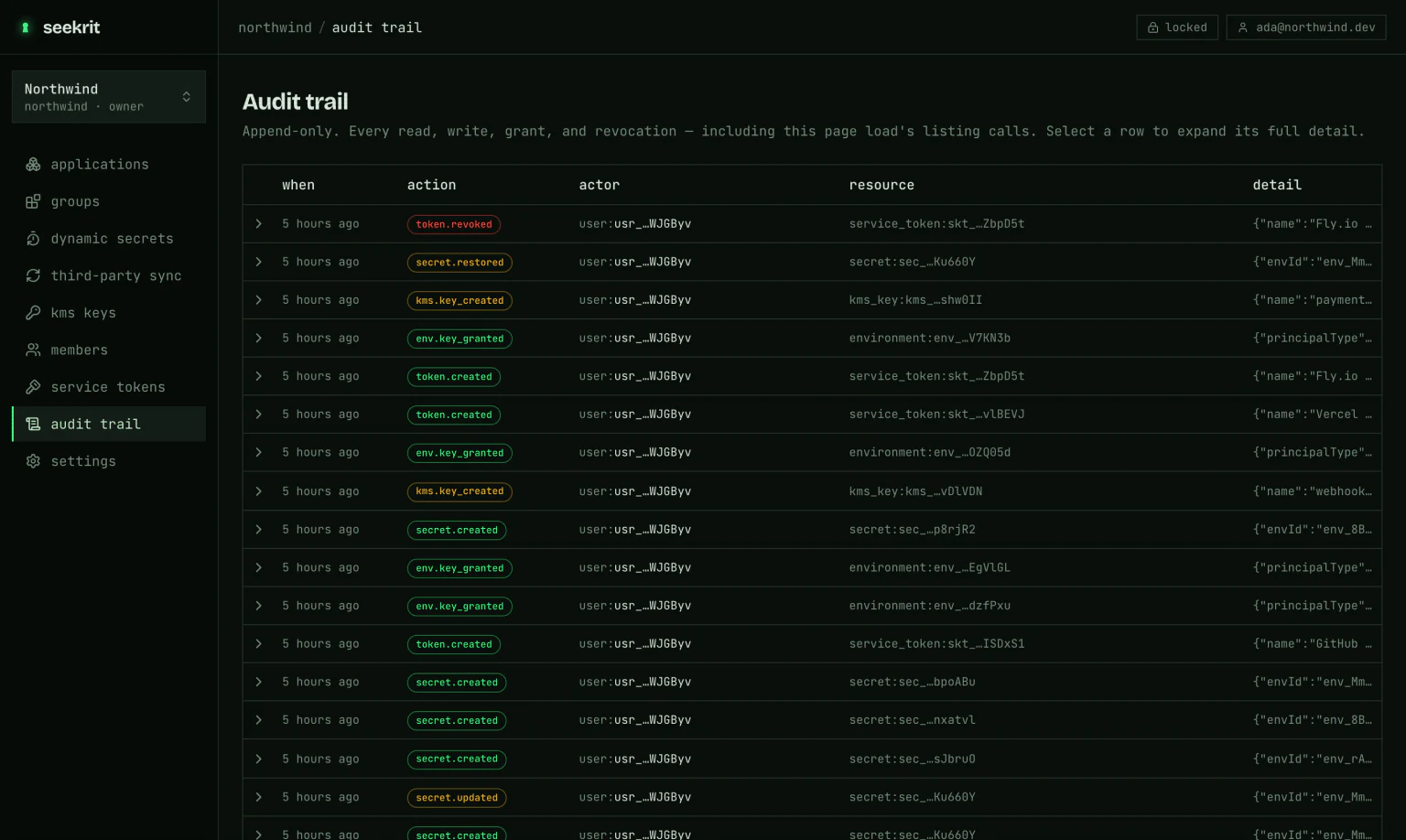
Exported records carry only what's already in your audit log: action, attribution (user or service token), IP, resource ids, and redacted metadata (names and counts). They never contain secret values, ciphertext, private keys, passphrases, or token strings.
Audit log export is a plan feature (Audit log export (SIEM)). Your plan & billing page shows whether your plan includes it; organizations on a plan without it see an upgrade prompt in place of the configuration form.
How it works
A per-organization background sweep runs every minute. For each configured
sink it finds audit rows not yet delivered, POSTs them to your
endpoint as an OTLP LogsData payload (content-type: application/json), and
marks them delivered only after your collector returns a 2xx. Delivery is
therefore at-least-once: if your endpoint is briefly unavailable, the same
events re-ship on a later tick rather than being dropped (repeated failures back
off exponentially, up to a few minutes between attempts).
Each event becomes one log record:
- Body — the audit action (e.g.
secret.created,token.revoked). - Severity —
WARNfor revocations, deletions, and denied resolves;INFOotherwise, so you can alert on security-significant events directly. - Attributes —
audit.id,audit.action,audit.resource_type,audit.resource_id,actor.type,actor.id,client.address, and the event's redacted metadata asaudit.metadata.*. - Resource —
service.name=seekrit, plusseekrit.org.idandseekrit.org.slug.
Configure a sink
In the dashboard, open your organization → settings (admins only), or from the CLI:
seekrit log-sink set https://collector.example.com/v1/logs \
  --header "Authorization: Bearer $COLLECTOR_TOKEN"

seekrit log-sink            # endpoint, header names, and delivery health
Or against the API directly:
curl -X PUT https://api.seekrit.dev/v1/orgs/$ORG/log-sink \
  -H "authorization: Bearer $SEEKRIT_TOKEN" \
  -H "content-type: application/json" \
  -d '{
        "endpoint": "https://collector.example.com/v1/logs",
        "headers": { "Authorization": "Bearer <your-collector-token>" },
        "enabled": true
}'- Endpoint — the full OTLP/HTTP logs URL, typically ending in
/v1/logs. - Headers — sent with every export request; use these for your collector's
auth (e.g.
Authorization, orDD-API-KEYfor Datadog). They are encrypted at rest and never returned — reads only ever show the header names. Omitheaderson a later update to keep the stored value; pass{}to clear it (--headerand--clear-headersrespectively, from the CLI). - Enabled — toggle export off without deleting the configuration.
When first configured, existing audit rows are marked as already delivered, so you receive events from that point forward rather than a backfill of history.
Test the connection
Send a synthetic event to verify connectivity and auth before you rely on it — click Send test event in the dashboard, or:
seekrit log-sink test # exits non-zero on failure, so it works as a health checkcurl -X POST https://api.seekrit.dev/v1/orgs/$ORG/log-sink/test \
-H "authorization: Bearer $SEEKRIT_TOKEN"
# → { "ok": true, "status": 200, "error": null }The dashboard and seekrit log-sink both surface the last successful export
time and the last error, so a misconfigured endpoint is easy to spot.
The header you configure is a credential for your collector. Anyone with admin access to the organization can change the endpoint — treat the ability to reconfigure the sink as security-sensitive, and prefer a scoped, rotatable token over a long-lived one.