Quickstart
This walkthrough takes you from zero to a running process with decrypted secrets: create your keys and first secret in the web console, mint a token, then inject it into any command with the CLI. Every value is encrypted on your machine — the API only ever sees ciphertext.
1. Sign in
Open the seekrit console and sign in with Google, GitHub, or an email and password. New here? Pick Create an account to sign up with your email — we'll send a link to set your password. The first time you sign in, seekrit provisions your organization automatically.
2. Set up your keys
You'll be prompted to create your encryption keys. The browser generates a P-256 keypair and encrypts the private key with a passphrase you choose. Only your public key and the passphrase-encrypted private key are uploaded.
Your passphrase is not your sign-in password. It never reaches the server, so there is no passphrase reset — if you forget it, your encrypted data cannot be recovered. Store it in a password manager. (Your sign-in password, if you use email/password, can be reset by email.)
3. Create an app, environments, and a secret
In the console:
- Create an application — say Storefront. The same dialog offers its environments
(
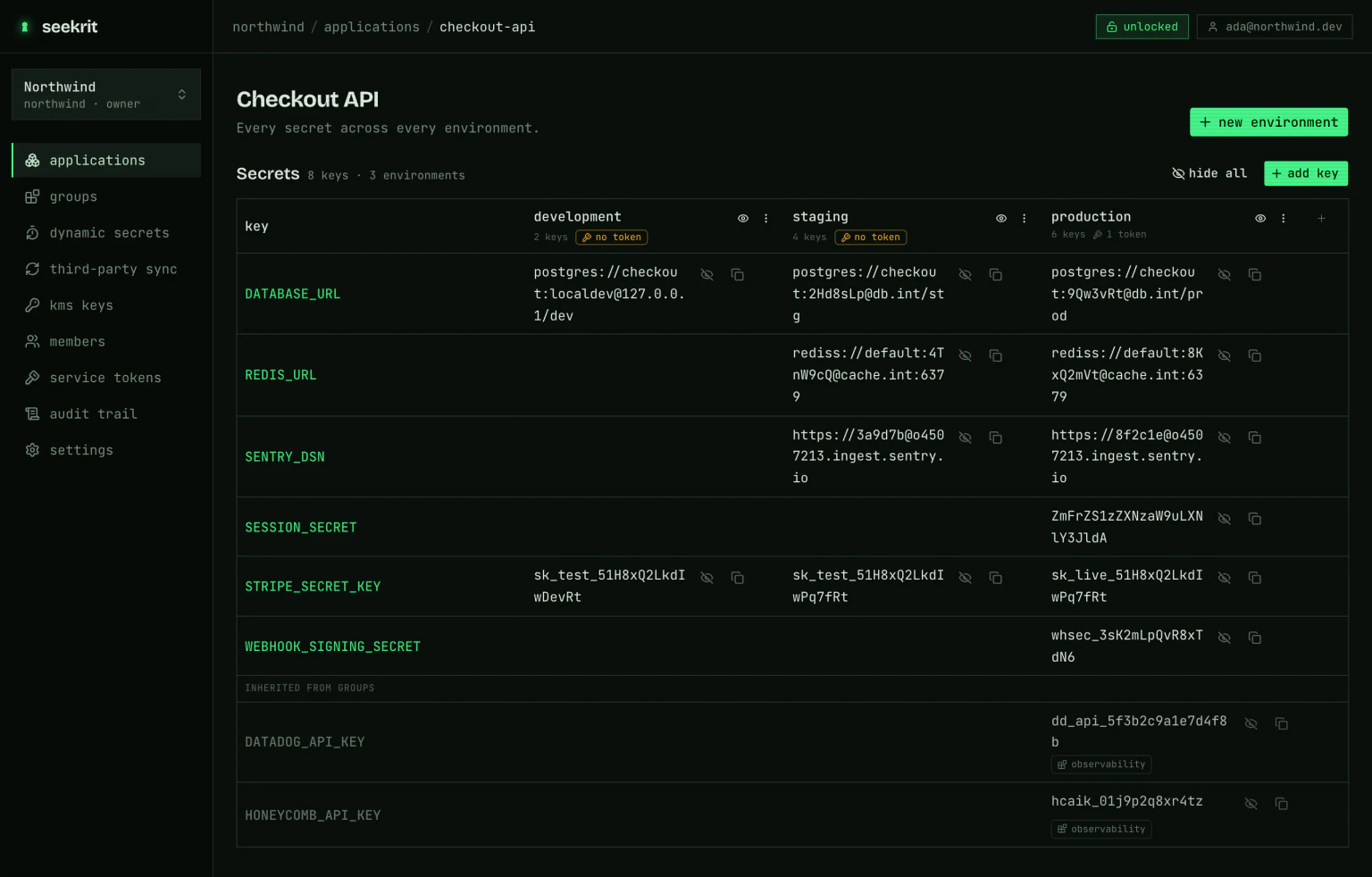
development,staging,productionare pre-selected; deselect any, or add your own), so you land on a matrix that already has columns. Each environment's data key is generated in your browser and wrapped to your public key. - Add a secret such as
DATABASE_URLwith add key — pick which environments get it and the value is encrypted separately for each one. Only ciphertext is uploaded.
The application page keeps a short Get this application running checklist until you've done all three of environments, secrets, and machine access — the third is the one that's easy to miss.
4. Mint a service token
A service token is how machines and the CLI read secrets. Until one exists, each environment column shows a no token warning — click it (or use the checklist's mint token, or the environment page's Key access panel) to mint one bound to that environment. The browser auto-grants it the environment's key, plus the keys of any composed group, and shows the token once. Copy it now.
export SEEKRIT_TOKEN=skt_…A runtime token carries its own org, app, and environment, so the CLI needs no config file or login to use it. It self-decrypts — no passphrase.
5. Inject secrets with the CLI
Install the CLI and let the token select everything at runtime:
npm install -g @seekrit/cli

seekrit run -- printenv DATABASE_URL       # inject into a process, then run it
seekrit export --format dotenv             # or print the resolved environment
Everything the token resolved was encrypted client-side. The API only ever returned ciphertext; the CLI decrypted it locally with the key embedded in the token.
Working at your own terminal rather than wiring up a machine? Run seekrit login instead: it
opens the console, you authorize the device, and the CLI acts as you across every org you
belong to — no token to copy. See the CLI guide.
Next steps
- Understand the encryption model
- Run secrets in containers, CI, and agents with
seekrit-run - Share config across apps with environments & groups
- Manage everything in the browser — the web dashboard guide
- Browse the CLI command reference