Your customer should connect an account, not paste a password into chat
Vault
Your agent has drafted the email. The customer likes it. Now they want it sent from their own account.
This is where a useful demo becomes an authentication project. Asking for an API key in chat is easy to implement, but the value can then travel with the conversation: into model inputs, saved histories, traces, and support tools. You have introduced a credential into systems built to remember and inspect what people said.
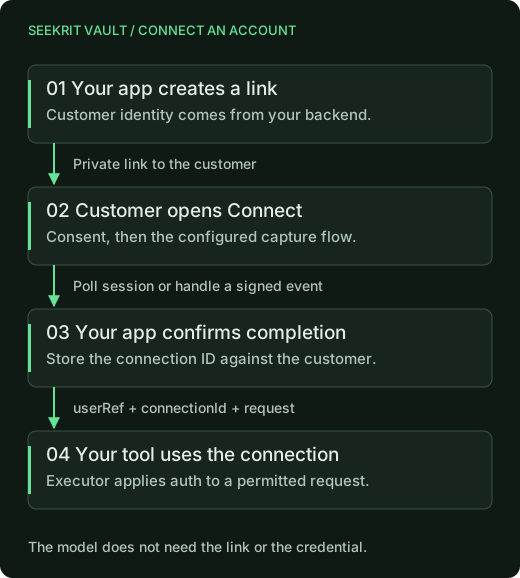
Seekrit Vault gives that moment its own flow. Your app creates a connection link. The customer opens it, sees what access they are granting, and connects their account. Your backend receives a connection ID it can use for subsequent requests. The customer's credential does not need to become a chat message.
Ask when the account becomes useful
Imagine an assistant that prepares customer updates. It can help write the first update before it has access to an email account. When the customer chooses to send, your app can explain the next step: connect the account that will deliver it.
That gives the connection a concrete purpose. The customer knows which service they are connecting and why. You can keep the requested permissions matched to that purpose instead of asking for every integration at signup.
Vault supplies the hosted Connect page, with your product's name, logo, and
consent summary. The customer does not need a Seekrit account. Your backend
identifies them with an opaque userRef from your own identity system.
For a configured API-key provider, creating the link looks like this:
import { Vault } from "@seekrit/sdk/vault";

const vault = new Vault();

// Backend code: use the authenticated customer's reference.
const link = await vault.connect.create({
  userRef: "u_123",
  providerId: "resend",
});

// Present link.url to that customer in your application's connection UI.
The provider must already be configured in your executor. Keep the link in the customer's UI; the model does not need it to reason about the task.
Different accounts can use the same product flow
Some providers use OAuth. Others ask the customer to generate an API key. Some workflows need a signed-in browser because the site has no suitable API. Vault has capture paths for those forms of access, including saved logins.
For typed credentials, the Connect page encrypts the value in the browser before uploading it. For OAuth, the authorization-code exchange happens in an executor you deploy in your own Cloudflare account. Seekrit stores the encrypted credential; your executor holds the key needed to use it.
Browser connections have their own capture and lease lifecycle, described in the browser-session guide. They still need your site's configuration and your automation. Adding credential custody does not make every website an integration automatically.
Resume the task after the connection is ready
A link being created is not the same as an account being connected. Your
backend can poll the Connect session or handle a signed connection.ready
webhook, then associate the completed connection with the waiting task.
Here is one status check from a backend handler. pending is an application
record saved when you created the link; look it up under the authenticated
customer rather than accepting a session ID from the model.
// pending and customer come from your authenticated application state.
const session = await vault.connect.get(pending.connectSessionId);
if (session.userRef !== customer.vaultUserRef) {
  throw new Error("Connection session belongs to another customer");
}

switch (session.status) {
  case "completed":
    if (!session.connectionId) throw new Error("Missing connection ID");
    // Your application helper: save metadata, never a token.
    await saveCustomerConnection({
      userRef: customer.vaultUserRef,
      connectionId: session.connectionId,
    });
    break;
  case "pending":
    // Keep the UI waiting; check again later with bounded polling.
    break;
  case "expired":
  case "cancelled":
    // Offer a new Connect link when the customer chooses to continue.
    break;
}
saveCustomerConnection represents your database write, not a Vault method.
Check the connection's current state before resuming work: completing the
Connect flow does not guarantee the customer has kept access enabled.
When an API tool runs, it calls vault.fetch through your backend. The
executor checks the customer reference and provider rules, applies the
credential to the permitted request, and redacts credential echoes from the
response. Your tool receives the result it needs to continue.
That keeps authentication work out of the conversation while preserving the interaction the customer wanted: draft something, connect an account, finish the job. You still build the email tool, choose permissions, and decide when sending needs confirmation. Vault supplies the credential lifecycle behind that experience.
Start with the Vault setup guide, then give customers a way to manage and disconnect their accounts.