Your agent needs a Disconnect button as much as a Connect button
Vault
A customer connects their email so your agent can prepare a daily briefing. A month later, they change roles. They still want the assistant, but they no longer want it reading that account.
They should be able to see the connection and disconnect it. Your agent should stop trying to use it. A job already queued for tomorrow should not silently restore the access they removed.
Those are product behaviors you need after the first successful API call. Seekrit Vault supplies the connection states and controls your application can build around, including a hosted page where customers can manage their own connections.
Make account access visible
Your app can create a manage link for the authenticated customer:
import { Vault } from "@seekrit/sdk/vault";

const vault = new Vault();

const manage = await vault.manage.create({ userRef: "u_123" });
// Show manage.url only to the customer represented by u_123.
That page lists the customer's connections in your project and lets them disconnect. They do not need a Seekrit account or a support ticket. Your app can put the link behind a "Connected accounts" entry in settings or offer it when the customer asks what the assistant can access.
Create it from authenticated backend state and deliver it privately. A manage link carries authority over the connections it displays; it is not something the model needs to inspect or retain in a conversation transcript.
Distinguish a broken connection from a withdrawn one
Your product should respond differently to these states:
| State | What your app can do |
|---|---|
active | Attempt the authorized task; provider errors are still possible. |
reauth_required | Pause affected work and offer a reconnect link with a clear explanation. |
revoked | Stop using the connection. Require a new connection flow if the customer chooses to grant access again. |
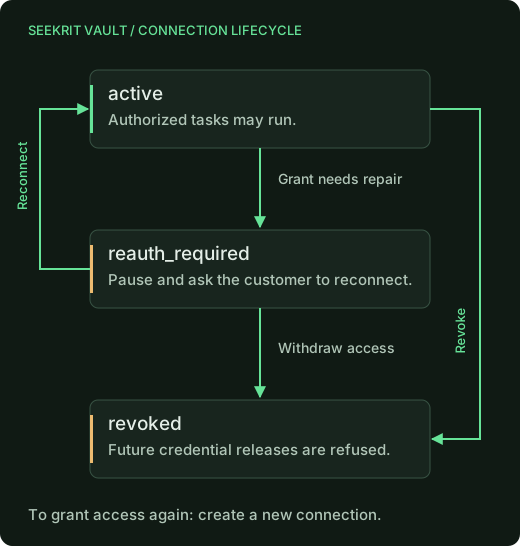
A reconnect repairs an existing connection. Your backend creates a Connect
session with purpose: "reconnect" and the same connectionId, customer
reference, and provider. The customer supplies fresh authorization and Vault
stores the next credential revision.
Revocation means the customer or platform withdrew access. Treat it as a decision. A revoked connection cannot be repaired through the reconnect flow; a new grant starts with a new connection.
This backend helper offers a repair only for the right customer and state:
async function reconnectForCustomer(userRef: string, connectionId: string) {
  // Both arguments must come from authorized application state.
  const connection = await vault.connections.get(connectionId);
  if (connection.userRef !== userRef) {
    throw new Error("Connection belongs to another customer");
  }
  if (connection.status !== "reauth_required") {
    throw new Error("This connection does not need a reconnect");
  }
  return vault.connect.create({
    userRef,
    connectionId: connection.id,
    providerId: connection.providerId,
    purpose: "reconnect",
  });
}
Return the resulting link to that customer's UI. If the connection is revoked between the check and link creation, handle the refusal rather than automatically creating a new grant.
What Disconnect stops
Vault revocation deletes the stored credential ciphertext and refuses future releases. Credential write-backs cannot revive a revoked connection. That matters when an OAuth refresh or browser session overlaps with the customer pressing Disconnect.
Revocation cannot recall an API request already dispatched, undo a sent message, or erase account data your application previously retrieved. Your own job cancellation and data-retention behavior must handle those cases.
There is also a difference between revoking in Vault and revoking the grant
at the provider. vault.connections.revoke(id) revokes in Vault. The
executor's revoke endpoint additionally attempts provider-side revocation
where configured; that provider step is best effort. Explain which control
your product offers instead of implying every token everywhere disappears.
Let events drive the experience
Vault emits signed connection.ready, connection.reauth_required, and
connection.revoked webhooks. Your backend can use them to update the
connected-accounts screen, pause scheduled work, or offer a reconnect when
the customer next opens the app.
Verify signatures, deduplicate deliveries, and reconcile with current connection state before resuming work. Events help the UI react; the executor's release checks remain the enforcement point if an event arrives late. Payloads carry connection metadata rather than credential values.
The signature check should use the raw request body. This handler skeleton accepts a delivery only after your application durably queues it:
import { verifyWebhook } from "@seekrit/sdk/vault";

async function handleVaultWebhook(request: Request, webhookSecret: string) {
  const event = await verifyWebhook({
    secret: webhookSecret,
    headers: request.headers,
    body: await request.text(),
  });
  if (!event) return new Response("Invalid signature", { status: 401 });
  if (event.type === "ping") return new Response(null, { status: 204 });

  // Application helper: atomically store once by event.id, then enqueue.
  // Throw on failure so the sender can retry instead of losing the event.
  await enqueueVaultEventOnce(event);
  return new Response(null, { status: 204 });
}
webhookSecret is the secret returned when you registered the endpoint.
enqueueVaultEventOnce is your durable queue or database integration. Its
consumer should fetch current connection state and update your UI or jobs
idempotently; a delayed connection.ready must not restart a revoked
connection. Signature verification alone does not deduplicate deliveries.
For an agent company, this means you can build the experience of granting, repairing, and withdrawing access around one connection lifecycle. You can explain what the assistant can reach and give the customer a working way to change it. The manage links and webhook guide shows the integration details.