Getting secrets into a Jupyter notebook without leaking them
Workflow
A notebook is the easiest place in a codebase to leak a credential. Two things about the format conspire against you.
The first is that a .ipynb stores outputs as well as source. Everything you
have ever typed into a cell and everything a cell has ever displayed is sitting
in one JSON file, and that file is the thing you commit, push, attach to a
ticket, and paste into a chat.
The second is that a notebook kernel does not inherit your shell. You export
a variable in .zshrc, launch JupyterLab from the app icon or from VS Code or
from a JupyterHub someone else administers, and os.environ comes up empty. The
usual habits for getting a credential to a process quietly stop working, and the
workaround that fits in five seconds is to type the key into a cell.
Here's what people actually do instead. Each option is reasonable in isolation, and each goes wrong in a different way.
The five things everyone does
Paste it into a cell.
os.environ["OPENAI_API_KEY"] = "sk-proj-…" # just for nowThis is by far the most common, and it's a one-way door. The key is in the notebook file, which means it's in git history, which means removing it later is a rewrite plus a rotation. It's also in every copy of the notebook anyone pulled in the meantime. GitGuardian counted 28.6 million secrets in public GitHub commits in 2025, and notebooks are heavily represented for exactly this reason.
Prompt for each one with getpass.
import getpass
os.environ["OPENAI_API_KEY"] = getpass.getpass("key: ")
Genuinely safe — the value goes into kernel memory and not the file. It also doesn't scale past about two secrets, and you retype all of them every kernel restart. Nobody keeps this up, and the failure mode when they stop is option one.
A .env beside the notebook, plus python-dotenv.
from dotenv import load_dotenv
load_dotenv()
Better ergonomics, and now you have a plaintext file of production credentials
on a laptop. It gets shared over Slack when a colleague can't run your notebook,
it drifts silently between everyone's copy, nobody knows who has it or when it
was last rotated, and sooner or later a .gitignore misses one. The problem
isn't dotenv; it's that the file has no owner.
Export before launching Jupyter.
export DATABASE_URL=…
jupyter lab
The clean answer when it works, which is only when you launched the kernel from
a shell you control. On JupyterHub, in Colab, in Databricks, in VS Code's
notebook UI, or against a remote kernel, it doesn't. It also breaks silently and
confusingly — the notebook runs, os.environ is missing a key, and you spend
ten minutes wondering which shell profile you put it in.
Call a vault SDK from a cell.
import boto3, json
sm = boto3.client("secretsmanager")
cfg = json.loads(sm.get_secret_value(SecretId="prod/analytics")["SecretString"])
os.environ.update(cfg)
This one is the correct instinct and still annoying in practice. It's a dozen lines of boilerplate per notebook. It has a chicken-and-egg problem: you need cloud credentials in the notebook to fetch the credentials in the notebook. And that block is written differently for AWS, GCP, Vault, and Azure, so a notebook that ran on your laptop doesn't run on the cluster.
Use the platform's secret panel. Colab has userdata, Databricks has
dbutils.secrets, Deepnote has its own. These are fine, and each is a different
API that exists on exactly one platform. Use them and your notebook is now
married to that platform, and your secret has a copy living there in addition to
wherever it lives for the rest of your infrastructure.
All five share the same trade: either the credential ends up inside a file that gets shared, or the code that fetches it only runs in one place. Most notebook workflows end up choosing which of those two problems to have.
What you want instead
Three properties:
- The token never enters the notebook file — not the source, not an output.
- The values never enter the outputs either, including the line that loads them.
- The same one call works in JupyterLab, in a scheduled
papermillrun, in a container, and in a hosted kernel — so the notebook you wrote is the notebook you ship.
One call
That's what seekrit.load() is. Install the SDK, put
this at the top of the notebook, and stop thinking about it:
pip install seekritimport seekrit
seekrit.load()If SEEKRIT_TOKEN is set in the kernel's environment, it's used. If it isn't,
you get a password prompt — ipykernel routes getpass to the notebook frontend,
so the credential goes into kernel memory and never into the .ipynb:
seekrit service token (skt_...):  [·······]
<seekrit: 7 secrets loaded from acme/analytics/staging: API_KEY, DATABASE_URL, …>
That output line is the second property at work. load() does not
return your secrets. It returns an object that holds the names it loaded and
the scope they came from, and it has no way to hand back a value — so the thing
that gets serialized into the notebook file when the cell renders is that
summary line. There is no result["API_KEY"].
The values are in os.environ, which is where your libraries were already
looking:
import os, psycopg

conn = psycopg.connect(os.environ["DATABASE_URL"])
Re-running the cell re-resolves everything and overwrites, so a rotated secret takes effect without restarting the kernel.
Scope is the part to get right
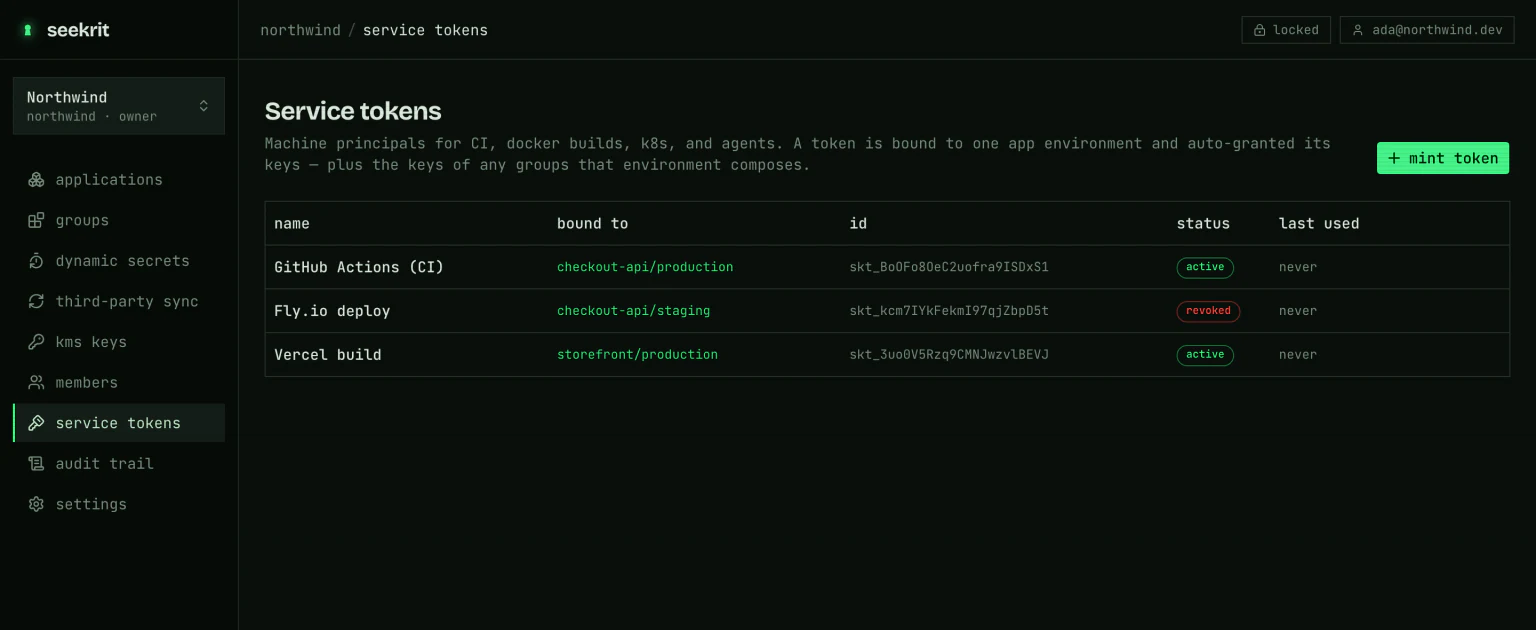
load() authenticates with a service token, and a token is bound to exactly
one app environment. That binding is the notebook's blast radius: mint a token for the read-only staging environment
your analysis should see rather than handing a notebook your production one.
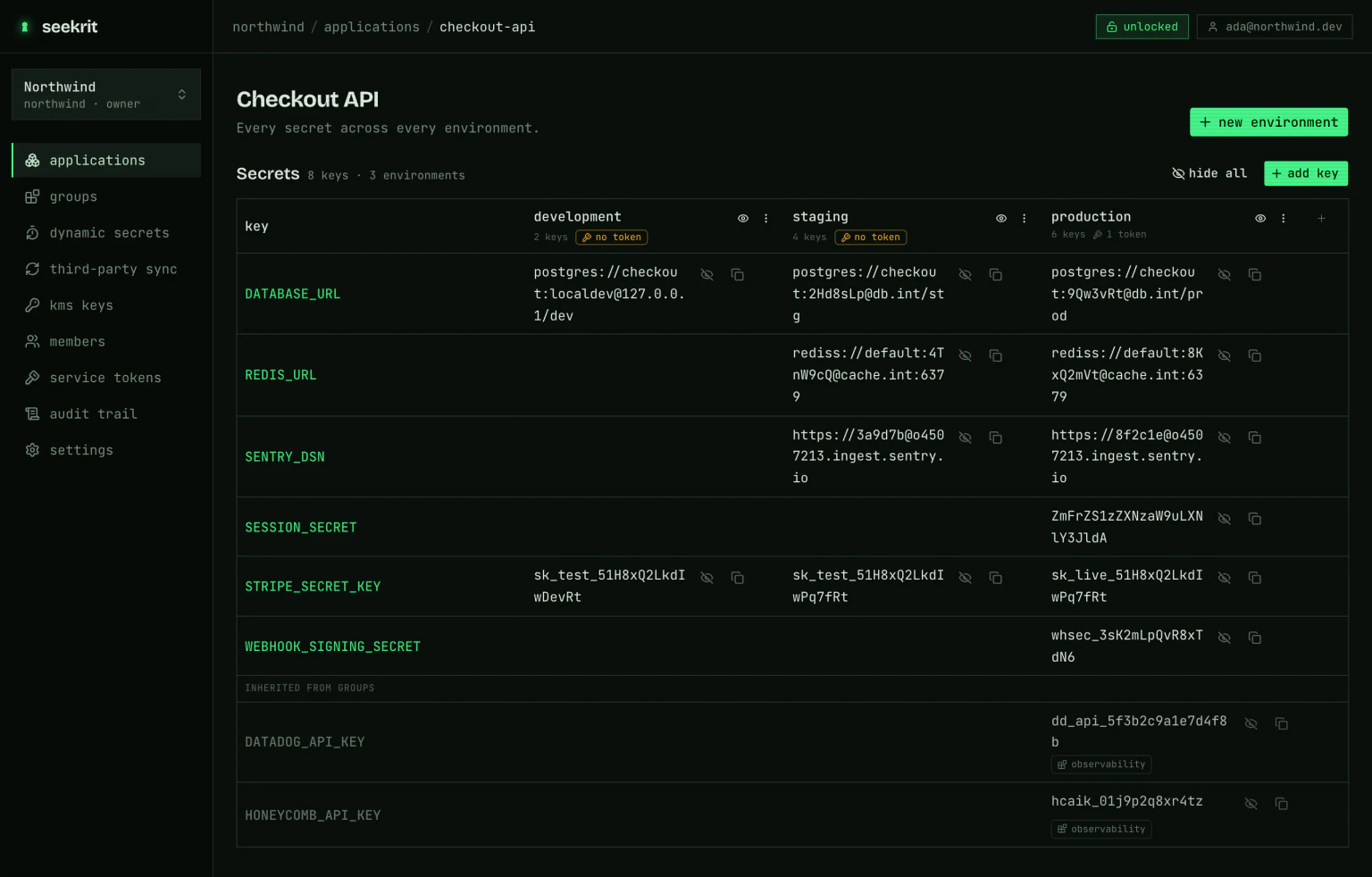
Behind it, the environment is just the set of secrets you already manage — one row per name, one column per environment. Pointing a notebook at a different environment means giving it a different token; the notebook code doesn't change.
seekrit is
zero-knowledge: the API returns ciphertext plus a
data key wrapped to your token's public key, and the SDK unwraps and decrypts
in the kernel. Replacing "a plaintext .env on a laptop" with "a plaintext
database at a vendor" would not have been much of a trade.
The part that usually breaks: deploying the notebook
What makes the first four options expensive is that a notebook rarely stays a
notebook. It becomes a nightly papermill job, or a
Voilà dashboard, or a container someone runs on
a schedule, or a step in CI. And every one of those transitions normally means
rewriting how the notebook gets its credentials — because .env files aren't in
the image, getpass has no frontend to prompt, and dbutils.secrets doesn't
exist off the cluster.
With load() there is nothing to rewrite. The notebook already reads
os.environ, and the only question each runner has to answer is where
SEEKRIT_TOKEN comes from — which is one environment variable, and every one of
these already knows how to set one.
Locally, or under Voilà: launch the whole thing with a token and the kernel
inherits it. load() finds it and skips the prompt.
SEEKRIT_TOKEN=skt_… seekrit run -- jupyter lab
SEEKRIT_TOKEN=skt_… seekrit run -- voila dashboard.ipynb
Scheduled and headless: papermill and nbconvert --execute run kernels
with stdin disabled, so there's no frontend to prompt. Set the token in the
environment that runs them and load() finds it. (If you forget, it says so
clearly instead of hanging on a prompt nothing can answer.)
SEEKRIT_TOKEN=skt_… seekrit run -- papermill analysis.ipynb out.ipynbIn a container: put seekrit-run in the entrypoint. It's
a single static binary — resolve, decrypt locally, exec the command. Nothing
in the image holds a secret; the image holds a token, and the token holds
nothing but a scope.
ENTRYPOINT ["seekrit-run", "--", "papermill", "analysis.ipynb", "out.ipynb"]In CI: one step, and every value is masked in the logs.
- uses: seekritdev/github-action@v1
  with:
    token: ${{ secrets.SEEKRIT_TOKEN }}
- run: papermill analysis.ipynb out.ipynb
On a hosted kernel — Colab, Kaggle, a shared JupyterHub — you have no shell,
so load() prompts each session, which is the right default for a notebook you
might share. If the platform has a secret store, keep the token there and pass
it through, so a shared notebook prompts its reader instead of carrying your
credential:
from google.colab import userdata
seekrit.load(token=userdata.get("SEEKRIT_TOKEN"))
Same notebook, five deployment targets, one line of code — you get to decide how a notebook is deployed after you write it.
What this doesn't fix
The safe-by-default part only covers what the SDK controls. A few leaks stay yours to manage.
Your own cells can still leak. print(os.environ["API_KEY"]) writes a
secret into the notebook file, and so does an exception traceback that renders a
connection string. Run
nbstripout as a git filter, or
jupyter nbconvert --clear-output --inplace, and treat a notebook that has ever
displayed a secret as needing a rotation.
Decryption happens in the kernel. That's what makes it zero-knowledge, and
it also means anything running in that kernel — including a library you
pip installed this morning — can read os.environ. A notebook is a single
address space, and no in-process approach changes that. If the thing running in
the notebook is untrusted, you want a proxy that
substitutes credentials on egress so the kernel never holds one at all.
The SDK is read-only. It resolves and decrypts. Creating, editing, and rotating secrets stays in the dashboard and CLI, behind a human's passphrase-protected key. A notebook holding a service token can read one environment and nothing else.
Try it
pip install seekritimport seekrit; seekrit.load()The full guide is at Jupyter notebooks, and there's a runnable example notebook if you'd rather read one than a blog post.