Build the agent's email tool without building a token service
Vault
Suppose you are building an assistant that turns a customer's notes into a weekly update and sends it through their email account. The product work is specific: understand the notes, draft an accurate message, choose recipients, show a preview, and report whether sending succeeded.
Then comes the work behind using the account: capture authorization, store tokens, refresh them, handle concurrent jobs, recover when access expires, and let the customer disconnect.
Seekrit Vault provides that credential lifecycle. Your team can build a tool around an authenticated request while keeping the customer's token out of the model's inputs and your application database.
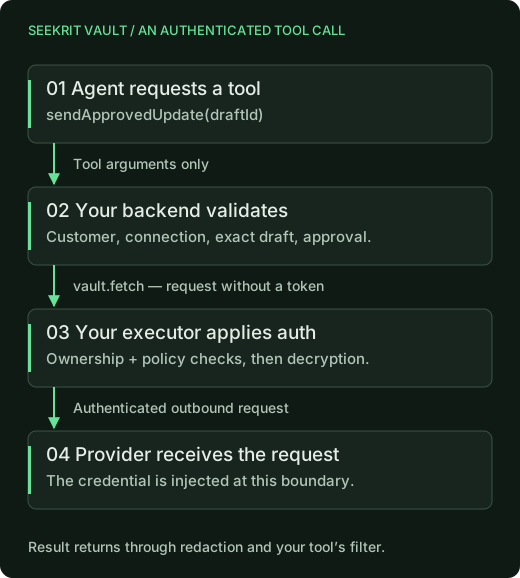
Keep the request in your tool and the credential in the executor
Vault does not ship a universal send_email tool. You implement the operation
your product needs and pass its HTTP request to vault.fetch, along with
the authenticated customer's reference and connection ID.
An executor in your Cloudflare account checks that the connection belongs to that customer and that the provider rules permit the destination, method, and path. It obtains the encrypted credential from Seekrit, decrypts it, refreshes an OAuth token when necessary, and applies it to the request. The response passes through credential-echo redaction before returning.
This lets you change the agent's prompts, model, or orchestration without moving customer tokens into those systems. Keep Vault's platform and executor credentials in trusted backend code. The model only needs the tool's inputs and the result your application chooses to expose.
Design a tool around the action the customer understands
For the weekly-update assistant, a useful tool boundary might be "send this approved draft." Your application resolves the sender account, loads the approved content, checks recipients, and constructs the provider request. It can give the model a message ID and a delivery status afterward.
Avoid making the model responsible for choosing an arbitrary URL, customer identity, and authentication headers. A small tool with validated arguments is easier to connect to the customer's intent.
There are several distinct checks in this design:
| Check | Who supplies it |
|---|---|
| Which signed-in customer requested the action? | Your application's authentication and authorization. |
| Does the connection belong to that customer? | Vault's executor ownership check. |
| May this provider credential reach this host, method, and path? | Provider rules configured in your executor. |
| Is this the draft and recipient list the customer approved? | Your tool and approval flow. |
Vault's rules are structural. A rule that permits an email-send endpoint does not know whether the recipient is correct or the message is appropriate. Keep the product-level checks in trusted code before dispatch.
A send-only provider and an approved-draft tool
For an assistant using the customer's Resend account, the executor's
vault.config.ts can allow just the send endpoint:
import { apiKeyProvider, defineVaultConfig } from "@seekrit/vault-executor";

export default defineVaultConfig({
  providers: [
    apiKeyProvider({
      id: "resend",
      displayName: "Resend",
      consentSummary: "send email updates you approve",
      rules: [
        { host: "api.resend.com", methods: ["POST"], paths: ["/emails"] },
      ],
    }),
  ],
});
That rule limits the endpoint. The approval check still belongs in your
application. The following backend tool loads an immutable approved draft;
customer comes from authenticated application state, and the model supplies
only draftId.
import { Vault } from "@seekrit/sdk/vault";

const vault = new Vault();

async function sendApprovedUpdate(draftId: string) {
  // Application helper: checks ownership, approval, and sending permission.
  // Returns the exact approved content and a stable ID for this send.
  const draft = await loadApprovedDraftForCustomer(customer.id, draftId);

  const response = await vault.fetch({
    userRef: customer.vaultUserRef,
    connectionId: draft.connectionId,
    request: {
      method: "POST",
      url: "https://api.resend.com/emails",
      headers: {
        "content-type": "application/json",
        "Idempotency-Key": draft.sendId,
      },
      body: JSON.stringify({
        from: draft.from,
        to: draft.to,
        subject: draft.subject,
        text: draft.text,
      }),
    },
  });
  if (!response.ok) throw new Error(`Provider status ${response.status}`);

  const result: unknown = await response.json();
  if (!result || typeof result !== "object" ||
      !("id" in result) || typeof result.id !== "string") {
    throw new Error("Unexpected send response; reconcile before retrying");
  }
  return { messageId: result.id, status: "accepted" };
}
loadApprovedDraftForCustomer is your application helper, not a Vault SDK
method. It must bind the selected connection, sender, recipients, and content
to the customer's approval. Reuse sendId for retries of that exact send and
keep your own durable send record. The provider's idempotency window is
finite; a timeout calls for reconciliation, not an unlimited retry loop.
The request follows Resend's send-email API. The sender must be authorized in the connected account. An accepted response means the provider accepted the request, not that the email was delivered. Notice that the tool never builds an Authorization header: the executor supplies the customer's key.
Reuse the connection across the work it authorizes
Once the customer has connected an account, later authorized jobs can use
the same connection without asking them to paste a token again. The executor
handles OAuth refresh, and your app can react to a connection becoming
reauth_required by pausing work and offering a reconnect.
The reusable piece is authentication. Each new tool still needs its own inputs, validation, error handling, and permissions. An email-reading tool and an email-sending tool may use the same account, but adding the latter deserves an explicit permissions and consent review.
For sites accessed through browser sessions, use the browser lease API and
your own automation rather than vault.fetch. Full browser-control tooling
can inspect session state, so keep that tooling behind a trusted boundary;
a restored session does not make arbitrary browser code credential-blind.
Spend engineering effort on the customer's task
You still register your OAuth applications, configure provider access, and operate the executor. Vault supplies hosted credential capture, encrypted storage, refresh handling, connection management, and authenticated execution. Those pieces can support several tools without becoming several separate token-handling implementations in your codebase.
For the weekly-update assistant, the next improvement can be a better preview or a clearer recovery flow for a failed send. The setup guide shows how to connect the first account; the custody inventory lays out the infrastructure Vault supplies.